
Mesh analysis calculator with steps
Updated
Draw your circuit, choose Mesh Current and Mesh Analysis, and Circuitsteps solves it step by step: the KVL equation around every mesh, the matrix they form, and every mesh current.
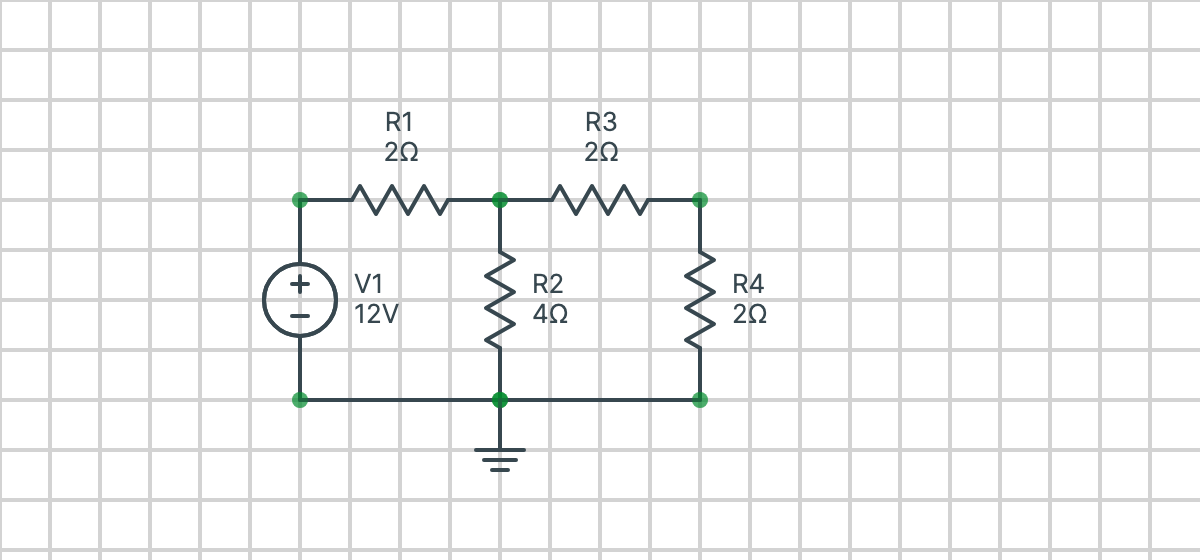
Edit the circuit above, or draw your own, then select Solve step by step.
How to use the mesh analysis calculator
- Draw the circuit. Choose a part from the toolbar, then click and drag on the grid to place it. Connect the parts' ends, using wires where you need them. Draw it without crossing wires, as each enclosed window of the drawing is a mesh.
- Enter the values. Double-click a part to change its value, such as or . Prefixes like k and m work too.
- Choose what to solve for: every mesh current, or just one mesh. The mesh numbers are shown on the circuit as you draw.
- Choose Mesh Analysis and solve. You don't need a reference node to find mesh currents.
What the solution shows
- A KVL equation for each mesh, with the voltage across every component written in terms of mesh currents.
- Current sources: one on the outside of the circuit sets its mesh current, and one shared by two meshes makes a supermesh.
- The equations simplified and written as a matrix.
- The matrix solved, giving each mesh current.
- If you ask for them, the branch currents, node voltages and the voltage across each component, worked out from the mesh currents.
What it can solve
Circuits with resistors, independent voltage and current sources, dependent sources, and capacitors and inductors at DC (where a capacitor is an open circuit and an inductor is a short circuit). As well as mesh currents, it can find node voltages, branch currents and the voltage across any component, with mesh or nodal analysis.
Example
In the circuit above, mesh 1 is on the left and mesh 2 is on the right, both clockwise. They share the resistor. Adding up the voltages around each mesh:
Simplified, these are and , which give
Solve this example in Circuitsteps to see every step.
Mesh or nodal analysis?
Mesh analysis finds mesh currents using KVL, and is usually quickest when a circuit has fewer meshes than nodes, or has voltage sources. Nodal analysis finds node voltages using KCL, and is usually quickest when it has more meshes than nodes, or has current sources. For circuits with controlled sources, see nodal analysis with dependent sources.
Frequently asked questions
Is the mesh analysis calculator free?
Yes. Circuitsteps is free to use, with no sign-up.
Does it show the steps?
Yes. It shows the KVL equation for each mesh, the equations simplified, the matrix they form, how the matrix is solved, and every mesh current. It can also go on to find the branch currents, node voltages and the voltage across each component.
Which way do the mesh currents go?
Every mesh current is clockwise. The meshes are found from your drawing, so each enclosed window of the circuit is one mesh.
Can it solve circuits with current sources and supermeshes?
Yes. A current source on the outside of the circuit sets its mesh current, and one shared by two meshes makes a supermesh, which is handled automatically. Dependent sources work too.
Does it work on a phone?
The circuit editor needs a larger screen, so use it on a laptop or desktop computer.